Telex and VNI
Put marks and tones anywhere in the word (tienge → tiêng). The tone moves to the right vowel as you type: hoaf → hòa, then n → hoàn.
Telex and VNI in every app — Windows 11 Notepad, browsers, Office, chat — side by side with your Japanese, Chinese or Korean input method. One small app, no Windows keyboard to add.
Why VietKeys
Typing tools fix a word by sending Backspaces and then the new letters. When several Backspaces arrive at once, Windows 11 Notepad (especially with a Japanese input method) applies only some of them, and words come out broken. VietKeys sends each Backspace on its own, in order, so every word comes out right.
Checked with an automated typing test in Windows 11 Notepad with the Microsoft Japanese IME.
| Fix sent all at once | VietKeys |
|---|---|
| toôi | tôi |
| dđang | đang |
| tiêńg | tiếng |
| chaào | chào |
Features
Put marks and tones anywhere in the word (tienge → tiêng). The tone moves to the right vowel as you type: hoaf → hòa, then n → hoàn.
While your input method is on (あ / 中 / 한), VietKeys leaves every key to it. Switch it off and you type Vietnamese again — nothing to quit or restart.
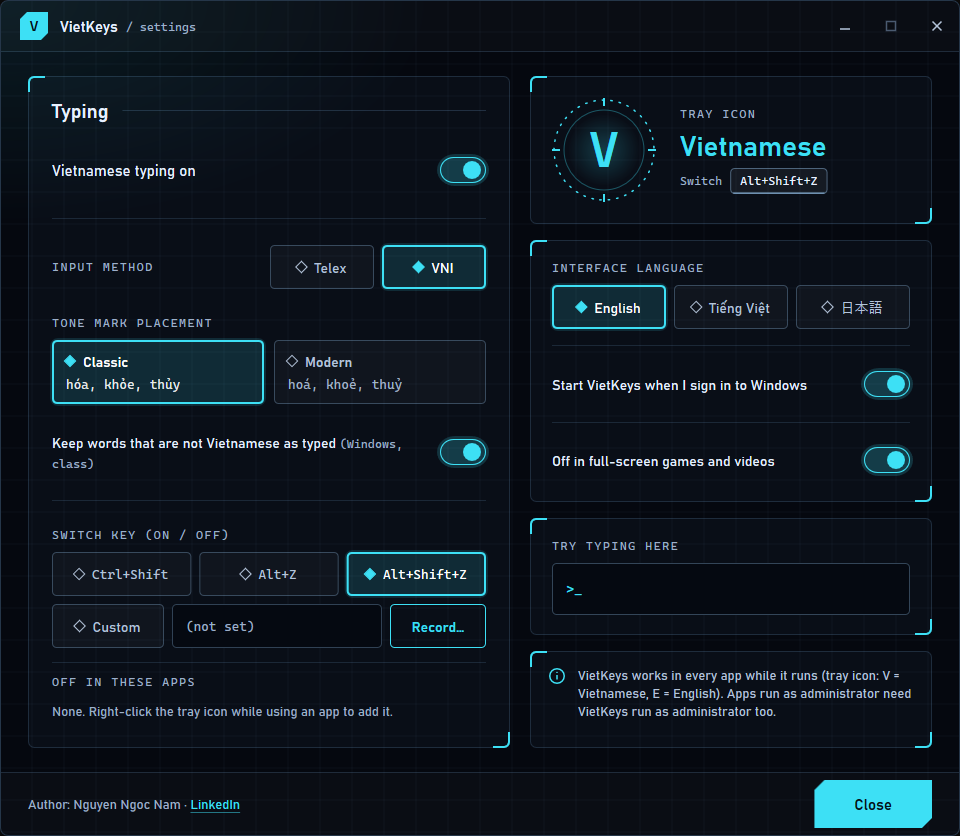
Full-screen games and videos get the real keys — StarCraft control groups 0–9 included. Turn VietKeys off for any other app with one right-click on the tray icon.
Delete back into a word and conversion comes back: Vi65t ⌫⌫⌫ e65t → Việt. Backspace over the space after a word to keep editing it.
Words that cannot be Vietnamese are left as you typed them: Windows, class, Notepad, text.
Ctrl+Shift, Alt+Z, Alt+Shift+Z or a shortcut you record. Only the one you choose works, so your apps keep their other shortcuts.
hóa, khỏe, thủy — or hoá, khoẻ, thuỷ. Your choice.
One 0.5 MB file. No internet connection, nothing collected — what you type stays on your PC. Interface in English, Vietnamese and Japanese.
Settings
Telex or VNI, tone style, switch key, games, and a box to try typing. Right-click the tray icon to open it.
Cheat sheet
Marks and tones can come anywhere in the word.
| Keys | Result |
|---|---|
| aa | â |
| ee | ê |
| oo | ô |
| aw | ă |
| ow | ơ |
| uw w | ư |
| uow | ươ |
| dd | đ |
| s | ásắc |
| f | àhuyền |
| r | ảhỏi |
| x | ãngã |
| j | ạnặng |
| z | removes the tone |
Tieengs Vieejt → Tiếng Việt
Press the same key twice to undo it: ass → as, ww → w.
| Keys | Result |
|---|---|
| 1 | ásắc |
| 2 | àhuyền |
| 3 | ảhỏi |
| 4 | ãngã |
| 5 | ạnặng |
| 6 | â ê ô |
| 7 | ơ ư |
| uo7 | ươ |
| 8 | ă |
| 9 | đ |
| 0 | removes the tone |
Tie6ng1 Vie65t → Tiếng Việt
Install
VietKeys-Setup-0.2.0.exe, 0.5 MB. One file, nothing else to download.
Pick your language, click Install, then Yes when Windows asks for administrator rights. VietKeys goes to C:\Program Files\VietKeys and starts when you sign in.
Look for V in the tray: V = Vietnamese, E = English. Press Ctrl+Shift to switch.
Click More info, then Run anyway. VietKeys is new and not yet signed with a code-signing certificate, so SmartScreen does not know it yet.
Same VietKeys.exe, with install.cmd, uninstall.cmd and a guide in English, Vietnamese, Japanese and Chinese. Or just run VietKeys.exe without installing.
Download zip · 0.2 MBSettings › Apps › Installed apps › VietKeys › Uninstall. Everything goes, settings included.
78848a10ac6bb9d5770ea95797e023577923a2e1da5b3d679d6d34d79435d204  VietKeys-Setup-0.2.0.exe
b3d46f7fe1930307d07aa2b7086eeb7c7c870cdda56c8be447a8511e84784a09  VietKeys-0.2.0.zip
FAQ
Yes. Download it and use it on as many PCs as you like.
No. VietKeys has no network code at all: it never connects to the internet, has no ads or analytics, and keeps its settings in your Windows user profile.
To type Vietnamese in every app, VietKeys watches the keyboard (a low-level keyboard hook, the same way Unikey works). Antivirus programs watch for that. Allow VietKeys.exe if asked.
Use one at a time: two typing tools would both change the same words. VietKeys warns you in its settings window while Unikey is running.
If that app runs as administrator, Windows blocks normal apps from changing its keys. Run VietKeys as administrator too, or start that app normally.
Windows 10 and Windows 11, 64-bit. VietKeys is one exe, with no runtimes or other files to install.
Free, small, and made for Windows 10 and 11.